Releases
Lens improves continuously from your feedback.
This page helps you stay on top of new updates, features, and bug-fixes.
Group by View, Quick-Select & Calibration Tracking
We’ve updated Pre6 Lens with several quality-of-life features to speed up your workflow.
New Features:
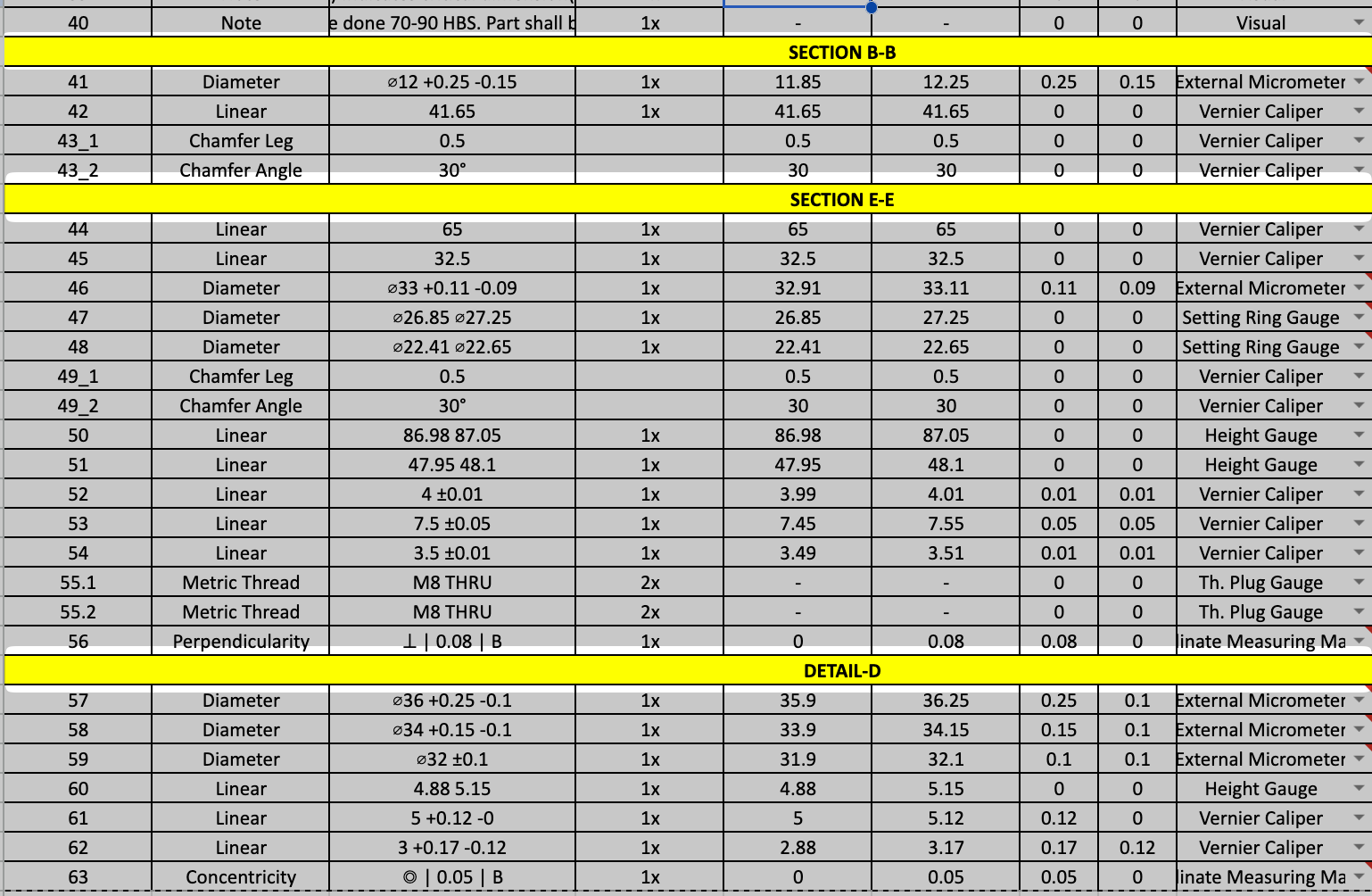
- Group by View in Inspection Plans: Dimensions can now be grouped by view in the generated inspection plans, with the view name shown above each group. Find this under Settings > Plan Export > Separate by View. Works for both default and custom formats.
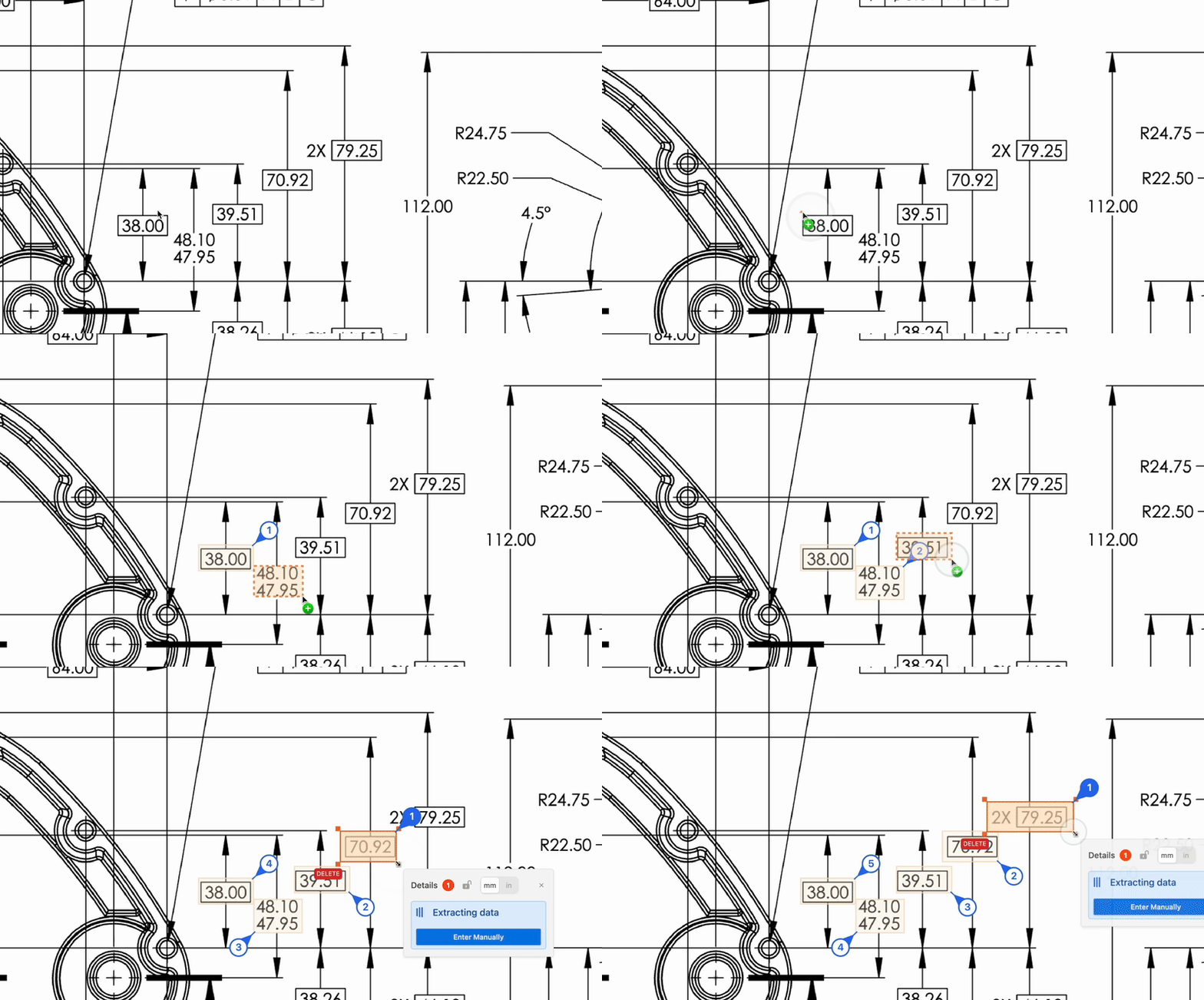
- Quick-Select Tool: Select all similar dimensions at once with the Quick-Select tool — for example, “Select all GD&Ts” or “Select all diameters”.
- Rotate Dimension Boxes: In crowded regions, rotate a dimension box to stop the AI from reading surrounding text.
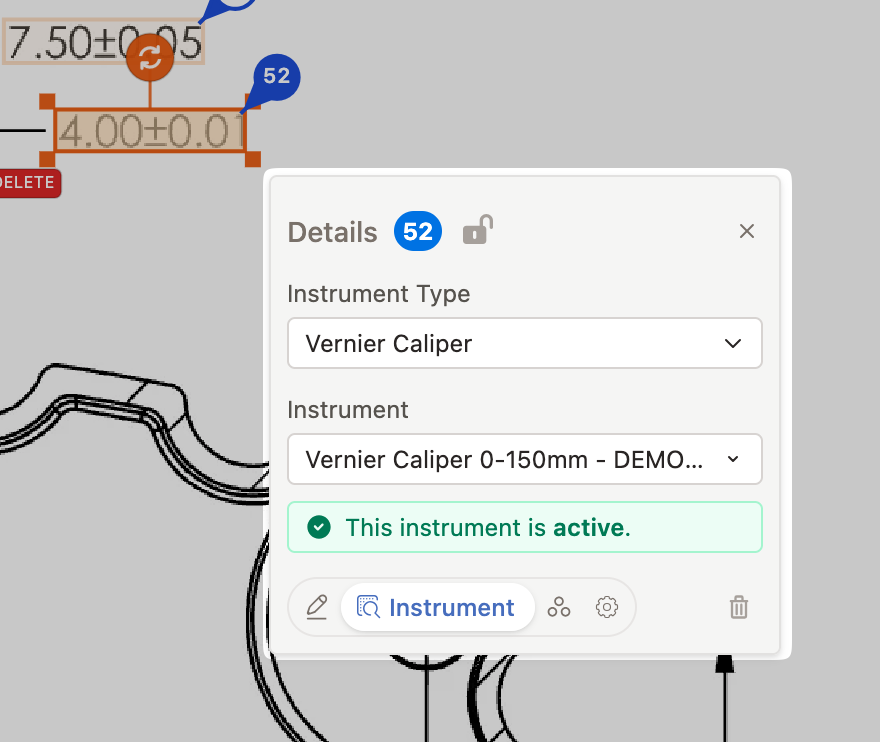
- Calibration Tracking in Instrument Assignment: When you assign an instrument to a dimension, Lens automatically detects whether any outdated or out-of-calibration instruments are being used.
Unit Conversion & Smarter Numbering
This release lets you switch between mm and inches with a click, and makes balloon numbering smarter.
New Features:
Switch Between mm and Inches: Flip any drawing between millimeters and inches with one click. Decimal places are preserved. Watch our video tutorial to see it in action.
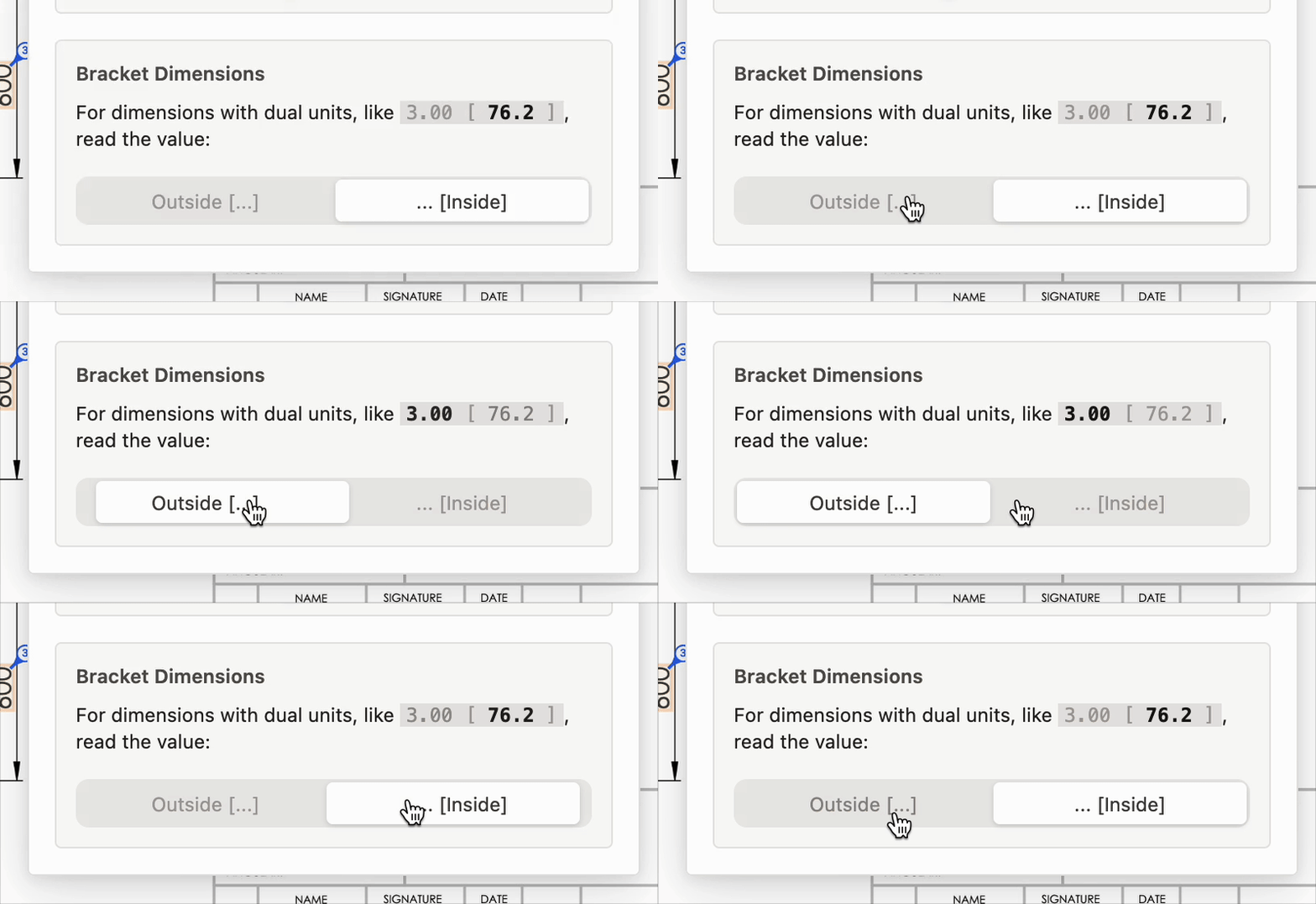
Bracket (Dual) Dimensions: Dimensions written with both units in brackets, like
25 [0.984], are now recognized automatically.
- Table Ballooning: Drag to select a table on a drawing, and Lens will balloon it automatically. Saving you from entering them by hand.
- Per-page Reference Grids: Each page of a multi-page drawing can now have its own reference grid, with support for two-character zones (e.g.
AA3). - Apply Tolerances by Group: Apply a tolerance to an entire dimension group in one go. You can also keep multiple tolerance standards on the same drawing and set which one takes priority.
Improvements:
- Smarter Balloon Numbering: Vertical numbering is now simpler and more predictable, top-of-drawing dimensions are grouped more sensibly, and keyboard navigation follows the balloon order you see.
- Neater Balloon Placement: When you add a new dimension, nearby balloons shift out of the way more cleanly so nothing overlaps.
- Smoother Performance on Large Drawings: Panning, zooming, and interacting with dimensions feel noticeably faster, especially on dense, multi-page drawings.
- More Accurate Dimension Reading: Better recognition of dash-separated limits like
10-12and degree-minute-second tolerances. Zone references like(A-5), stray zeros, and other non-dimensions are no longer picked up as dimensions.
Resizable Views, ISO 286 Tolerance Classes & Smoother Performance
This release brings more canvas control, smarter tolerance handling, and a smoother overall experience.
New Features:
- Naming Conventions for Custom Inspection Formats: Custom export formats now follow the same naming convention rules as standard formats, ensuring consistent file naming across all exports.
- Automatically Apply ISO 286 Tolerance Class: Tolerance classes from ISO 286 are now automatically applied to dimensions when detected on the drawing.
- Resizable Views with Side Handles: You can now resize views directly on the canvas, giving you precise control over which area of the drawing each view covers.
Improvements:
- Smaller Balloon Sizes: You can now reduce balloon size further than before, giving more flexibility on dense drawings.
- Tolerance in Compound Dimension Rows: Compound sub-characteristics now display their tolerance in the requirement column of inspection plans, matching the format used by simple dimensions.
- Preserved Conditional Formatting in Exports: Conditional formatting in your custom Excel templates is now preserved in the exported inspection plan.
- Improved Export File Integrity: Exported Excel files now better maintain workbook integrity, reducing the chance of Excel repair prompts when opening.
- Smoother Performance: Interactions with the drawing elements now feel smooth and natural.
Bug Fixes:
- Improved Scanner Reliability: Improves scanning reliability and reduces network related failures.
- Undo Restores Dimension Rows: Using Ctrl+Z to undo a view deletion now correctly restores the associated dimension rows.
- “Continue Where You Left Off” Reliability: Your browser restores your previous session more reliably.
Group-wise Plan Exports, Directional Ballooning & Gauge Suggestions
This week’s release adds stronger inspection-plan control, better ballooning control, and a cleaner export workflow.
New Features:
- Group-wise Inspection Plan Export: Choose exactly which dimension groups to include in your inspection plan. Organize groups by manufacturing operations or critical characteristics.
- Custom Ballooning Direction: Pick clockwise or counter-clockwise balloon numbering from the settings panel.
- Gauge Auto-suggestions: Gauges managed in Lens are now auto-suggested during inspection plan generation. Suggestion rules can be customized by tolerance limits, dimension type, and dimension range.
- New Export UI: A redesigned export panel improves clarity and gives faster access to custom export format management.
Fixes & Improvements:
- When you de-select ‘REF’ checkbox for a dimension, tolerances get re-applied correctly.
- Dimension edit safety: Pressing delete on an empty feature-type field no longer deletes the dimension.
- Minor consistency fixes: Fixed smaller inconsistencies across parsing output, export behavior, and inspector interactions.
Dimension Groups, Teardrop Balloons & Major UX Improvements
This release introduces powerful new organization tools, deeper export control, and a wide range of usability improvements and bug fixes.
New Features:
- Dimension Groups: Organize dimensions into custom named groups with color-coded labels. Assign dimensions individually or drag-to-select multiple at once. Groups appear in the sidebar, in the dimension inspector, and in exported inspection plans.
- Teardrop Balloons: A new teardrop balloon shape is now available alongside the classic circle. Switch between shapes in Settings > Balloons.
- Custom Start Balloon Number: Set balloon numbering to start from any number (e.g., 100 or 1000) instead of always starting at 1.
- Custom PDF Filenames: Choose your own filename when downloading PDFs and select which content to include — all, redactions only, or balloons only.
- GD&T Text Export: Export GD&T callouts as formatted text (e.g., ⌖ | 0.05 | A | B | C) instead of image crops in inspection sheets. Toggle between Image and Text modes in Settings.
- Reference Grid in Custom Templates: Custom templates now support grid reference zones.
Improvements:
- Settings Menu Overhaul: The settings panel is now draggable, remembers its position, and features a cleaner tabbed layout with an inline balloon preview.
- Consistent Design Palette: Refreshed colors and consistent styling across all pages.
- Better Thread Depth Parsing: More accurate recognition of thread depths on drawings.
- Spotface Diameter Parsing: Spotface diameters are now correctly extracted.
- Improved Titleblock Parsing: More complete extraction from title blocks.
Bug Fixes:
- Fixed balloon collision detection so balloons no longer overlap nearby dimensions.
- Fixed canvas flickering when interacting with the drawing.
Auto-Ballooning of Notes, and more
We’re excited to bring you a packed update with auto-ballooning of notes, a brand new user manual, grid reference zones, and much more.
New Features:
- Notes Detection: Automatically detects notes on your drawings.
- User Manual: Step-by-step guides for every feature. Read it here.
- Grid Reference Zones: Dimensions now show their grid location (e.g., “A3”, “B5”). You can also define zones manually.
- Save Custom Tolerance Standards: Save your custom tolerances for reuse across drawings.
- Edit Balloon Numbers: Manually change balloon numbers with lock/unlock control.
- Page Selection for Large Drawings: Choose which pages to process on multi-page documents.
- “Continue Where You Left Off”: Resume your work right where you stopped.
- Sub-characteristics: View and add sub-characteristics (like chamfer angle, thread pitch) to dimensions.
- Custom Feature Types: Add your own feature type if the preset ones don’t fit.
- Title Block Editing in Sidebar: Easier access - no more floating popup.
Better Dimension Recognition:
- Angular dimensions: Now shows degrees, minutes, seconds properly (e.g., 45°30’15”)
- Holes: Better recognition of counterbores, countersinks, slots, and compound holes
- Threads: Recognizes threads with different tap/drill depths
- Spherical radius: Recognizes “SR” dimensions
- Chamfers: Better at telling chamfers apart from other angled dimensions
Improvements:
- Smoother zooming with mouse scroll wheel
- Dimension inspector no longer hides behind the toolbar
- Faster loading when opening drawings
- Tolerances now apply correctly to compound dimensions (like counterbore holes)
Sidebar overhaul & Enhanced dimension support
We’re kicking off the new year with a major update packed with new features, improvements, and bug fixes.
New Features:
- Redesigned sidebar: A cleaner, more intuitive sidebar layout for easier navigation.
- Unverified dimensions filter: Quickly filter to show unverified dimensions, helping you focus on what needs attention.
- Excel formulae in inspection sheets: AI-generated inspection sheets now include Excel formulae.
- Add Note tool: New tool in the toolbar to annotate drawings with notes.
- Intuitive Template Editor: Edit your custom templates just how you want it.
- Characteristic Designators: Automatic and manual detection of Critical parameters.
- Hole dimension parsing: The system now recognizes and parses hole dimensions from drawings.
- Additional dimension notations: Support for more dimension notation formats.
- Views section: Views are auto-highlighted when the Views tab is selected.
- New tolerance standards: Added IS 4897 Class II and ISO 8062 CT-11 casting standards.
Improvements:
- AI templating accuracy: Improved accuracy for AI-powered template auto-fill.
- Dimension inspector UX: Smoother movement of the dimension inspector when zooming in/out.
Bug Fixes:
- Angular dimensions show up with proper formatting in excel sheets.
- Balloons are consistently positioned even on rotated PDFs.
- Improved OCR and parsing of direct limits dimensions with dual values (inch/mm).
- The toolbar no longer moves when the window is resized.
AI-powered templating & Enhanced accuracy
We’re excited to announce or latest release packed with features and enhancements.
New Features:
- Industry leading data extraction: Our recognition engine for dimensions and notes now matches human cognition on accuracy.
- AI auto-fill for inspection plans: Templates are now scanned and filled automatically, saving you tons of time on data entry
- Floating tools panel: Tools moved to a handy floating window so you have more screen space to work.
- Keyboard shortcuts: ‘H’ for hide-detections, ‘V’ for re-ordering by view, ‘A’ for adding a new dimension, etc.
- Precise decimal measurements: You can now enter measurements accurate to 4 decimal places
Improvements:
- Faster performance: Large drawings load and respond more smoothly, even on older computers.
- Hide detections enhancement: Hidden detections reveal themselves on hover, so you’re able to resize them.
- Better measurement reading: Fixed how the system direct-limits format from drawings.
- Bug fixes: Fixed several bugs that customers previously faced on the app .
Formatting options & Improved UI
- Custom balloon styling: Size and colors of balloons can now be customized from the settings panel in the top-right corner.
- Instrument suggestion: Automatic suggestions for measurement instruments, editable in the dimension editing panel.
- Enhanced feature representation: Auto-parsing of more complicated dimensions, such as arcs and chamfers, along with their counts.
- Support for more complex dimension types: Dimension types like ‘Dowel diameter’, ‘Threaded hole’, and others, are now also supported.
- Balloons no longer obscure dimensions: The algorithm to place balloons has been improved. Balloons will now avoid overlapping with nearby dimensions for greater clarity.
Customizable, higher quality exports
We’ve revamped our PDF export functionality to give you more control on appearance.
Optional highlighting: Previously, dimensions were always highlighted upon download. Now, you can choose to disable this in the settings panel in the top-right corner.
Connector lines: You can now choose to include connector lines that relate balloons with their corresponding features. This option is also available in the settings panel.
Smaller file size: Downloaded PDFs are now much lighter.
Vector drawings: Vector graphics are now preserved in downloaded PDFs, resulting in higher quality images.
Introducing the Lens changelog.
We’ve added this dedicated page to keep you posted on new features, updates, and bug-fixes with every release.
- bug fix: Tolerances now correctly applied to repeat dimensions (
12PL,4X, etc.). - feature: An all new /releases page.
Improved OCR and TIFF support
With this release, we’ve made significant leaps in our OCR technology, while also improving the user experience for managing different views in an inspection report.
New features
- A new section in the sidebar to see, modify, and rename views.
- Auto-scanning an entire view instantly with the
Add viewbutton. - Adding a new dimension now auto-OCRs it instantly.
Improvements
- Significantly faster and more accurate OCR, tuned for technical drawings.
- Downloaded PDFs have much lower file size.
Standard and custom tolerances
We’ve added support for tolerances in our latest release. You can now select a tolerance standard from our pre-defined collection, or define one on your own. By default, lens supports popular standards like ISO 2768 and ASME Y14.5.
Features
- Auto-scan tolerance specification from a table present in the drawing.
- Define custom tolerances for your drawing.
- Select standard tolerances, like DIN-ISO 2768.
Lens is out of closed beta!
Lens enters an open beta phase, and is generally available to the wider world.
Upload your first drawing and see how Pre6 Lens can speed up your QA process. No sign-up required for your first few tries.
For questions, check out our FAQ page or reach out to us.