Manufacturing Costing
CAD to Quote
in Seconds.
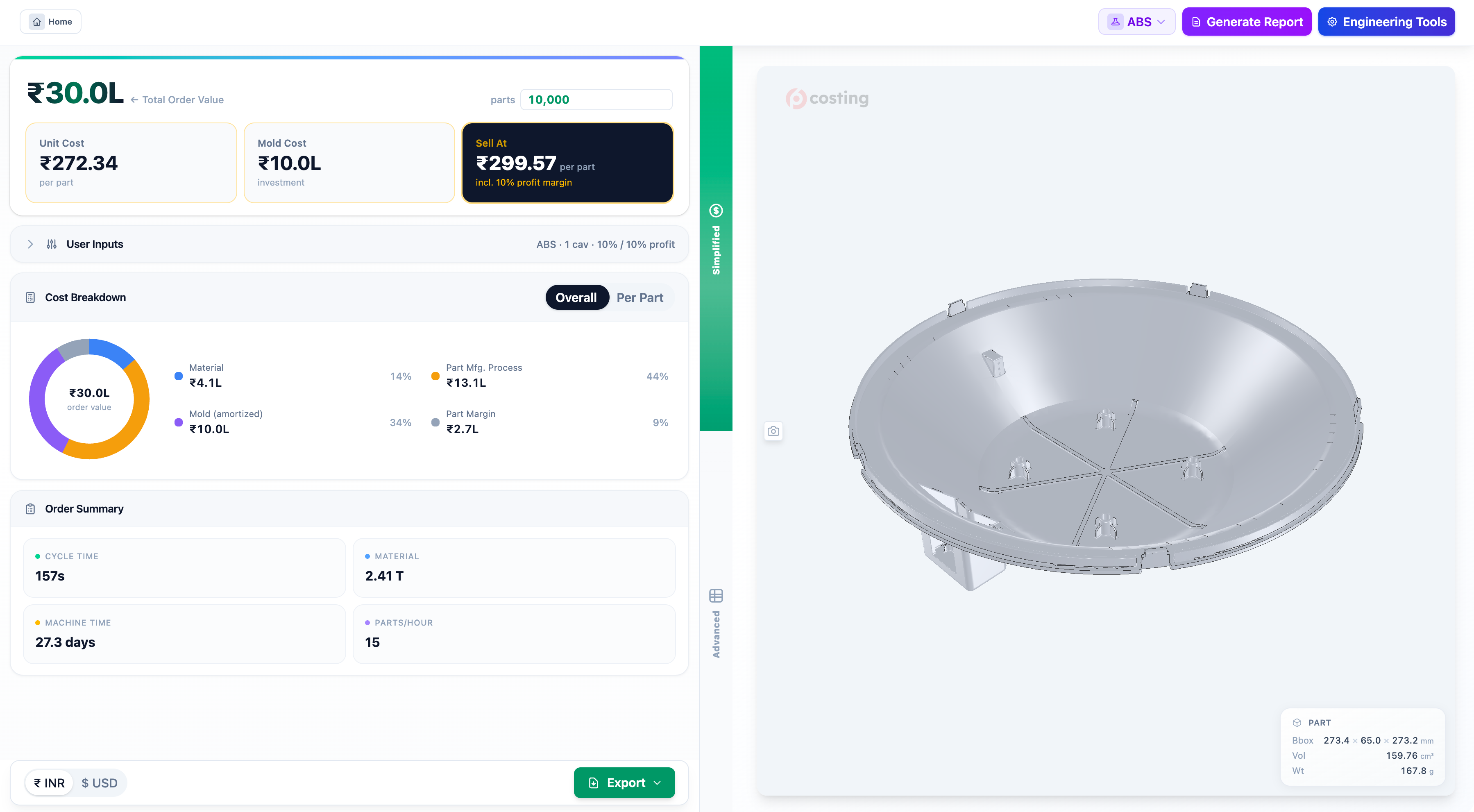
Upload a STEP file. Get an instant per-part cost breakdown — material, tooling, manufacturing. Export to Excel.
< 60s
Quote Time
30+
Materials
100%
Browser-Based
Mold fill simulation, run in the browser — the cycle time your quote is priced on.
How It Works
Upload
Drop any STEP file. No install, no signup required.
Analyze
Geometry parsed, features detected, costs calculated automatically.
Export
Per-part cost breakdown ready. Export to Excel or branded PDF report.
Under the hood
A quote is only as good as
the engineering behind it.
Pre6 doesn’t guess at cycle time or steel volume. It simulates the melt front, splits the mold, lays the cavities out on the plate and sizes every plate in the stack — then prices exactly what it built.
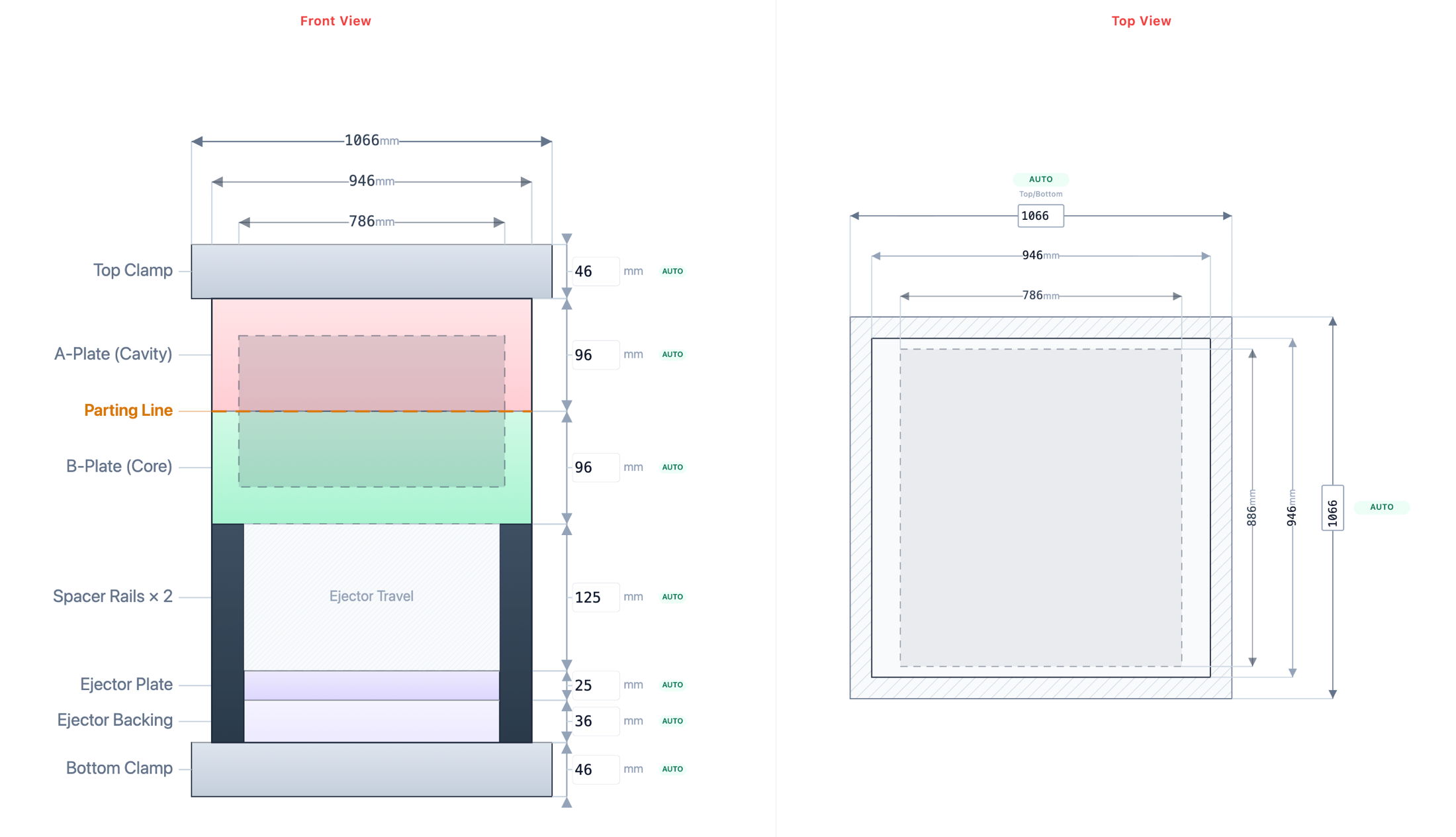
Mold layout, fully dimensioned
Front and top views of the plate stack — clamp plates, A and B plates, spacer rails, ejector travel and backing — each one sized from the part and the cavity field. That steel volume is what your tooling cost is priced on, not a rule of thumb.
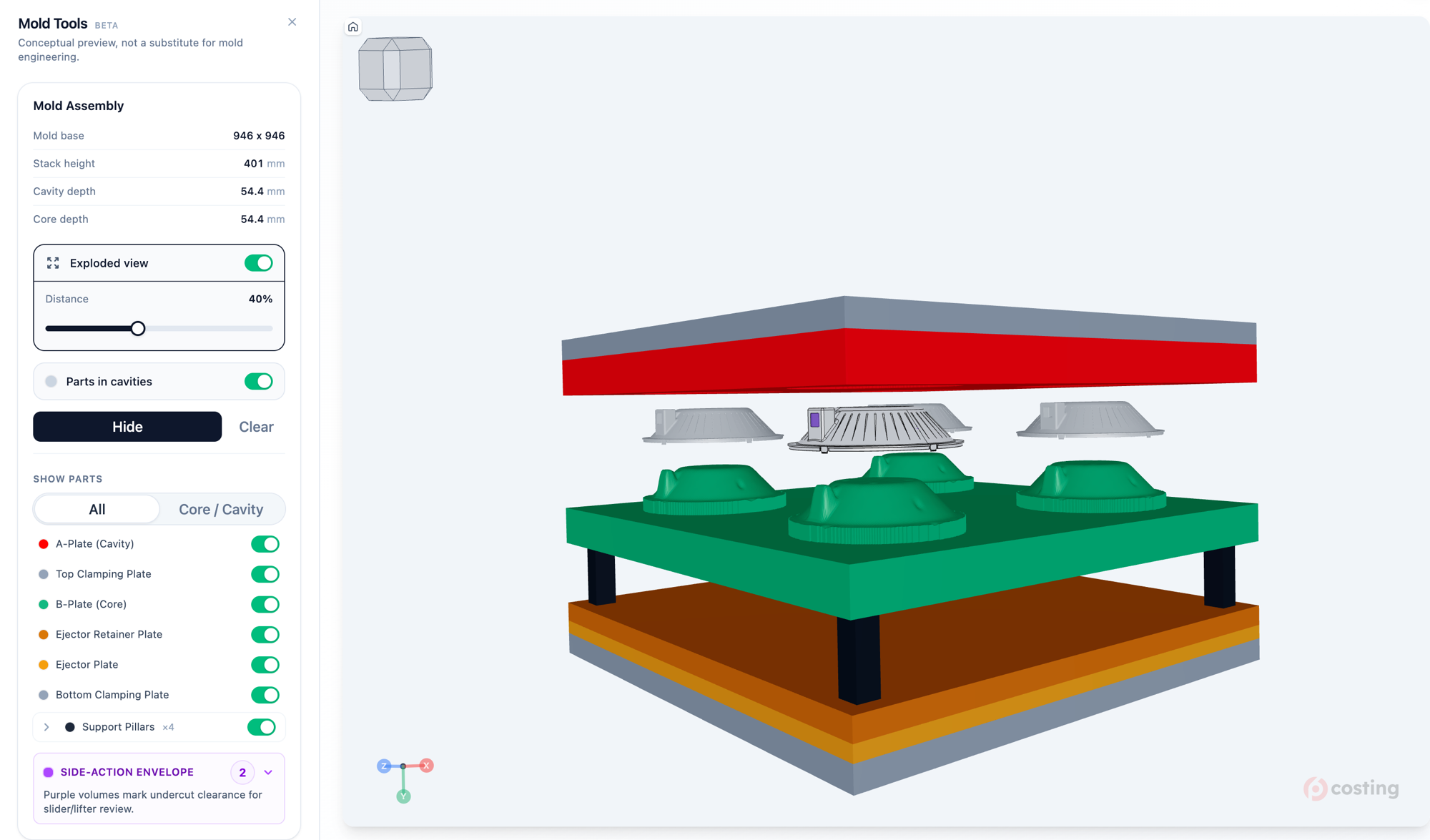
The whole mold, exploded
Every plate, support pillar and ejector in 3D. Undercuts are flagged as side-action envelopes, so the sliders and lifters you’ll actually pay for show up before you quote.
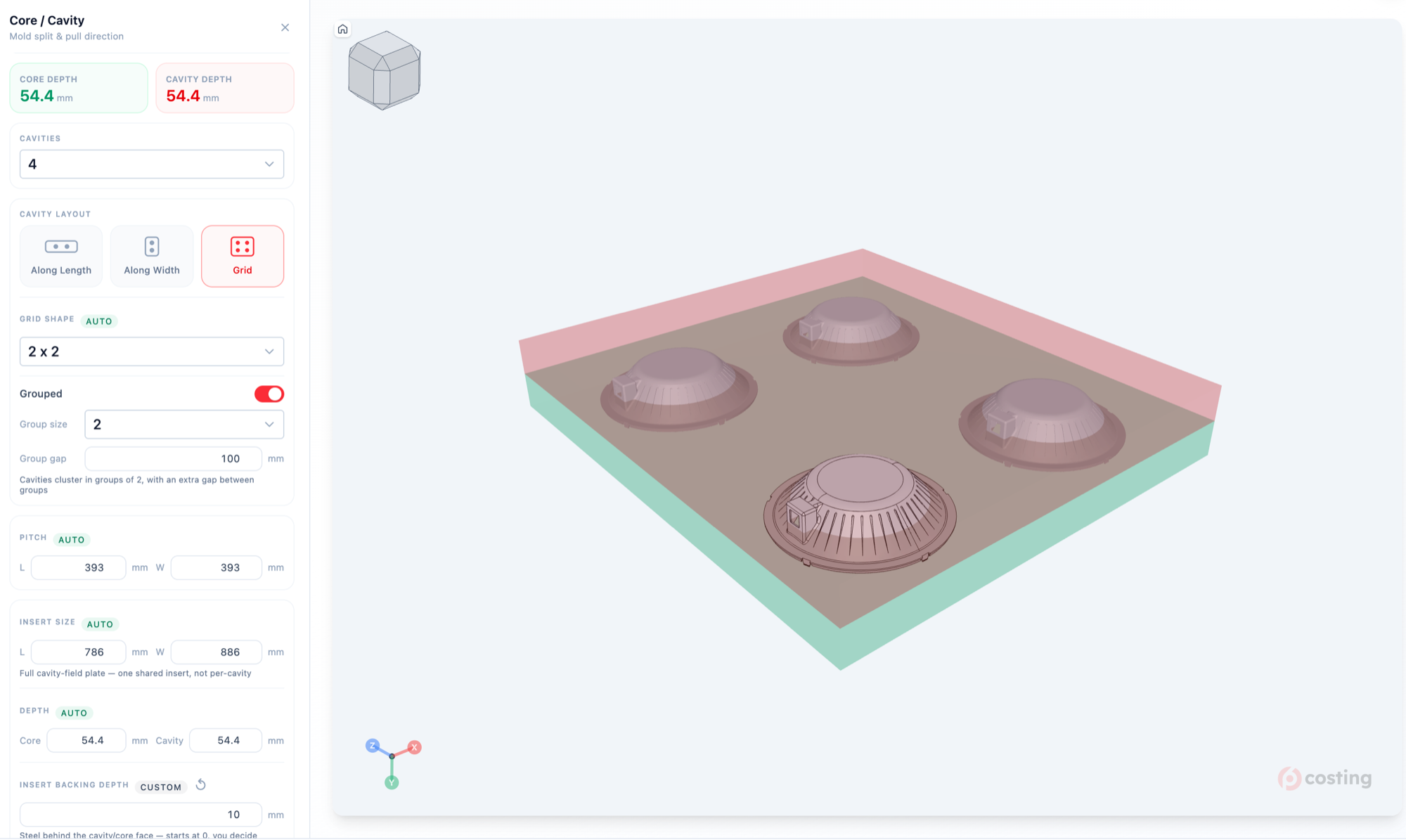
Cavity layout, solved
Pick a cavity count and Pre6 packs it — in line, across, or in a grouped grid — then derives pitch, insert size and depth. Change the layout and the tool price moves with it.
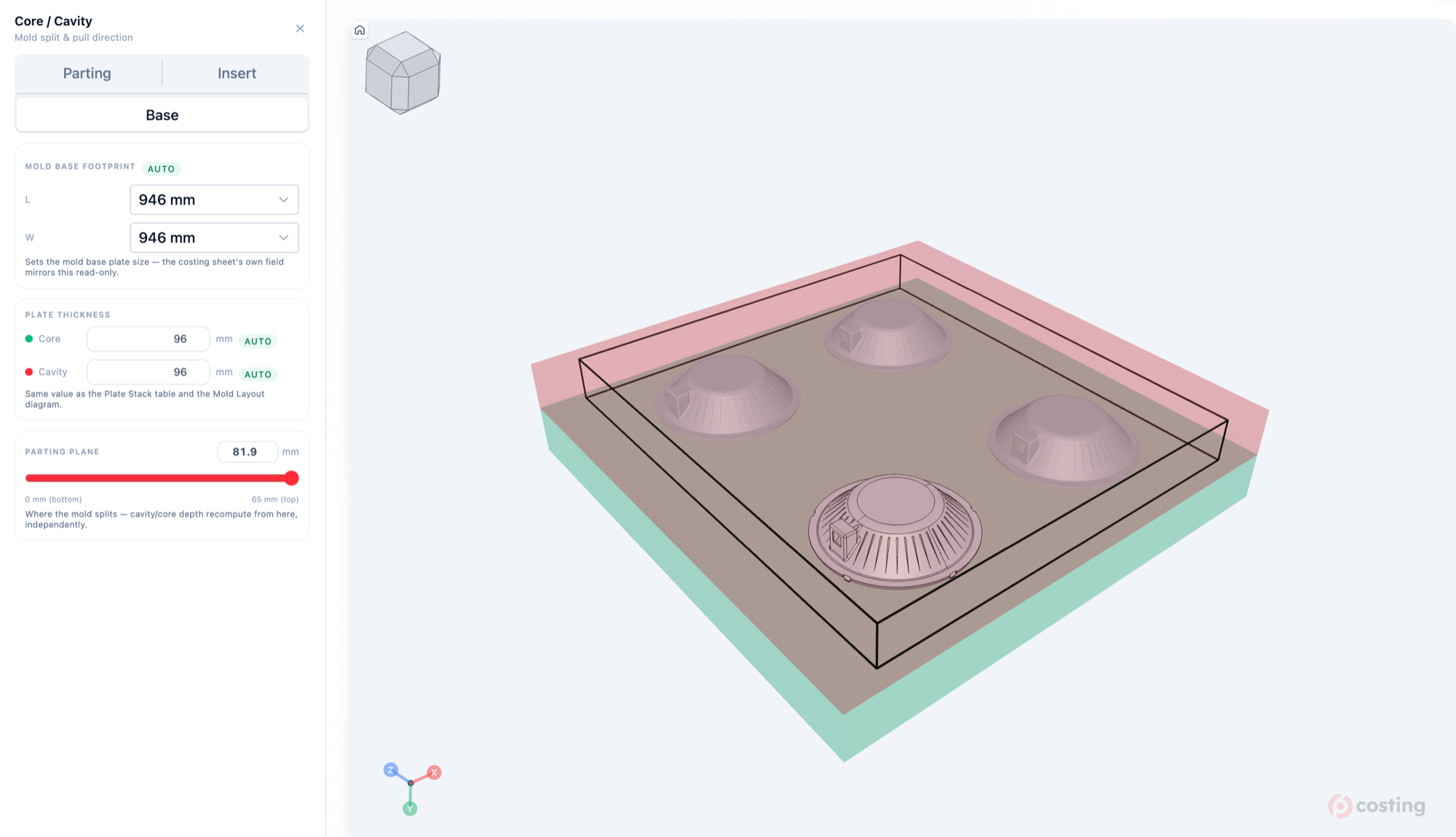
Move the split, watch it recompute
Drag the parting plane and core and cavity depth recompute independently. Mold base footprint and plate thickness follow — and so does the cost sheet.
Everything the engines derive
Then every one of them
becomes a line you can defend.
Material, machine, tooling, treatments, inspection — each number traced back to the geometry and the simulation that produced it. That is the whole point of doing the engineering first.
Built-in Engines
Injection Molding & HPDC.
Costed from geometry.
Features, cycle time and tooling, derived straight from 3D geometry — then priced on rates you control.
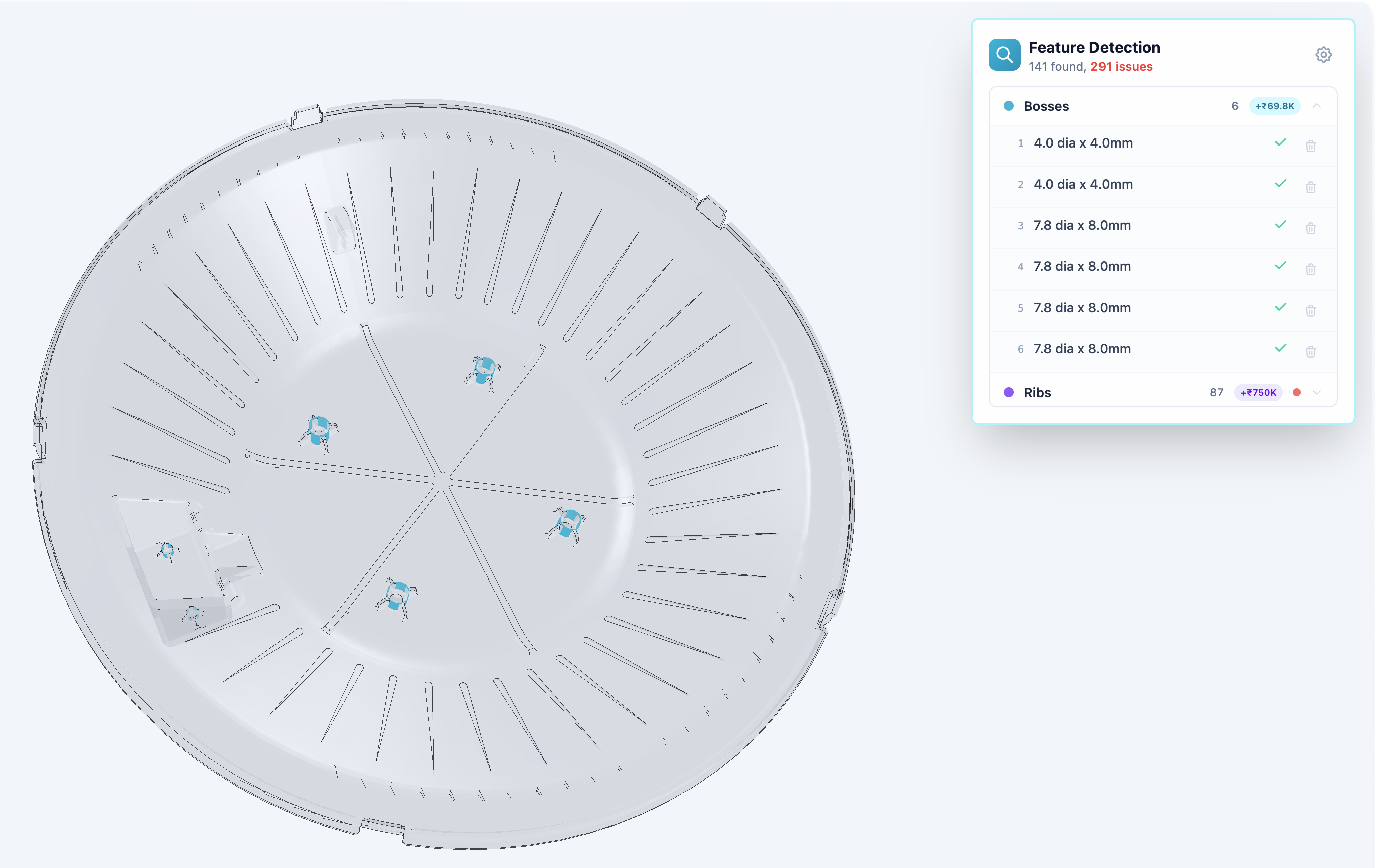
Feature Recognition
Bosses, ribs, holes detected automatically
Tuned to your shopfloor rates
Machine, labour, overhead, margin — your numbers, saved once
Tooling Breakdown
Steel, ejectors, sliders, cooling — line by line
Volume Pricing
Instant recalculation at any quantity
AI Mode
Talk to your 3D model.
Ask in plain language — “is this part moldable?”, “should-cost at 50,000?”, “is this tooling quote fair?” Pre6 runs your DFM and costing engines and answers, with the results painted on the model.
Numbers you can trust
Every figure comes from your costing engine — never invented
Shown on the model
Heatmaps and fill painted on the 3D view as it answers
Who it's for
Built for the whole product team.
From first sketch to signed PO, Pre6 puts the same cost and manufacturability truth in front of design, procurement, and the shop floor.
Design teams
Stop waiting on the moldflow queue to iterate. Pre6 keeps designers DFM, manufacturing process and cost-aware as they work — so the concepts they ship are manufacturable from the first pass, not the fifth.
Procurement teams
Walk into supplier talks with leverage. Benchmark mold and part quotes against an independent should-cost, and compare the same part across China, India, Germany, and Japan — so you negotiate region-aware, not blind.
Manufacturing & tool-room
Quote in minutes, not days. Pre6 frees estimators and the tool-room from grinding out manual quotes, so their time goes to the high-value work only they can do.
Pricing
Pay per quote.
One account. You only pay for the quotes you generate.
In-built Process
RecommendedDFM-powered costing.
Injection Molding & HPDC. Full engineering suite — DFM, fill simulation, and costing from geometry.
First 3 analyses free after sign-in. No credit card required.
Frequently Asked Questions
How accurate is the costing?
Pre6 Costing uses the same cost drivers as production quoting: material weight, cycle time from fill simulation, clamp force for machine sizing, and feature-based tooling surcharges. Every parameter is editable so you can match your shop rates.
Can I use my own pricing assumptions?
Yes. Machine hour rates, material costs, tooling markups, margin percentages, and feature surcharge rules are all configurable. Make it match your actual shop economics.
Does Pre6 use generic industry rates?
Only until you replace them. Every quote starts from published defaults that carry a source and a confidence badge, and your rate book overwrites any of them — machine hour rates, operator labour, factory overhead, material prices, tool-room markups, scrap and margin, in your currency. Save once and your rates apply to every new quote across the workspace, so two estimators quoting the same part get the same number.
How long does it take to set up our rates?
You can quote on the defaults immediately. A guided tour walks you through the rate book on first login, most shops start by replacing machine hour rates, labour and overhead, and you can autofill from a machine or material datasheet instead of typing. A filter shows only the fields you have changed, and any tab resets to our defaults if you want to start again.
How is Pre6 different from other costing tools?
Most costing tools either skip geometry (you type dimensions in by hand) or hide their cost model behind black-box pricing. Pre6 reads STEP files directly and exposes every cost driver so estimators can audit each number — and it's the only one you can talk to: ask a question in plain language and it runs the DFM and costing engines and answers right on the 3D model. It also bills per RFQ instead of by enterprise seat — no annual contract, no procurement cycle.
Can I compare what this part would cost in different regions?
Yes. The Insights tab includes a Regional Preview that prices the same part through any combination of USA, India, China, Germany, and Japan rate libraries side-by-side. Every regionally-driven rate carries a citation — source URL, methodology, derivation formula, and confidence badge — so procurement buyers can audit each number. The comparison and full citation chain export to a new tab in the costing Excel workbook alongside the existing mold and part sheets.
Can I run "what if?" scenarios on my quote?
Yes. The Insights tab's Compare Scenarios panel lets you clone your quote and edit a variant (material, cavity count, production qty, gate type, steel grade, surface finish, mold-life shots) — costs recompute live as you type, with red/green deltas. The Cost Drivers panel ranks the biggest geometric drivers (bosses, ribs, holes, complexity flags, slider undercuts) and gives each a "What if no X?" action that shows the inline manufacturing-cost savings and highlights the affected faces in the 3D viewer.
Can I just ask the AI instead of clicking through tools?
Yes — it's called AI Mode. Ask a question in plain language ("is this moldable?", "should-cost at 50k?", "is this tooling quote fair?") and Pre6 plans an investigation, runs the right DFM and costing tools for you, checks the numbers, and answers with heatmaps and results shown on the 3D model. It's the fastest way to a defensible number.
Does the AI invent numbers?
No. Every figure it reports comes from the same DFM and costing engines that power your quote — never a guess. Before it answers, a verify step confirms each number came from a real tool result and that the figures reconcile with each other.
Can I try AI Mode without an account?
Yes. Upload a part in the free demo and you get 5 AI questions on the house — no sign-up required. Create a free account to keep going.
Get in touch
Quote your next RFQ with us.
Tell us where you quote today and we'll set your rate book up with you — machine rates, labour, overhead, in your currency.
Still wondering if Pre6 Costing is right for your quoting process?
Ask your favorite AI about Pre6 Costing's capabilities and how it compares to manual quoting.